Naive RAG: The Foundation of Retrieval-Augmented Generation
Naive RAG - The foundational RAG technique that combines vector similarity search with LLM generation. This article explores how Naive RAG works, when to use it, real-world applications, and why it remains the starting point for most RAG implementations despite its limitations. For a comprehensive comparison of RAG frameworks including Naive RAG, see this…
What this covers
- Context
- The Weekend That Changed Customer Support
- What Is Naive RAG?
- How Naive RAG Works: The Three-Step Process
- Real-World Performance: What to Expect
- When Naive RAG Succeeds: Ideal Use Cases
- When Naive RAG Fails: Understanding Limitations
- The Technology Stack: Building Your First System
- Migration Path: When to Move Beyond Naive RAG
- How mCloud Runs RAG in Production
- Conclusion: Start Simple, Scale Smart
Context
Naive RAG - The foundational RAG technique that combines vector similarity search with LLM generation. This article explores how Naive RAG works, when to use it, real-world applications, and why it remains the starting point for most RAG implementations despite its limitations. For a comprehensive comparison of RAG frameworks including Naive RAG, see this research analysis.
Key Topics:
Vector similarity search fundamentals
Embedding models and vector databases
Retrieval-augmented generation architecture
Real-world performance metrics and use cases
When Naive RAG succeeds and when it fails
Technology stack recommendations
Use this document when:
Building your first RAG system
Understanding the foundation that advanced RAG techniques build upon
Evaluating whether Naive RAG meets your requirements
Learning vector search and embedding concepts
Choosing between RAG techniques for simple use cases
"Every advanced RAG system starts with a simple question: Can I find relevant documents and generate an answer? That's Naive RAG, and for thousands of companies, it's enough."
The Weekend That Changed Customer Support
In March 2024, a mid-sized SaaS company's customer support team was drowning. Their product documentation spanned 500+ pages across multiple wikis, knowledge bases, and help articles. Support agents spent an average of 12 minutes per ticket searching for answers, often failing to find the right information entirely.
That Friday, their engineering lead built a Naive RAG prototype over the weekend. By Monday morning, they had a chatbot that could answer 60% of common support questions in under 2 seconds, pulling directly from their documentation.
The results after one month:
Average ticket resolution time: 12 minutes → 4 minutes (67% reduction)
First-contact resolution rate: 45% → 72% (60% improvement)
Customer satisfaction scores: 3.8/5 → 4.6/5 (21% increase)
Support team capacity: Handled 2.3x more tickets with the same headcount
This wasn't magic—it was Naive RAG. Simple vector search combined with GPT-4, deployed in 48 hours, delivering immediate business value.
The lesson: You don't need advanced RAG techniques to solve real problems. Naive RAG is fast, inexpensive, and sufficient for a surprising number of use cases. Understanding it is essential because every advanced technique builds upon—or reacts to—its limitations.
What Is Naive RAG?
Naive RAG is the simplest form of Retrieval-Augmented Generation. It combines three components:
A knowledge base (your documents, databases, or data sources)
A retriever (vector similarity search to find relevant information)
A generator (a Large Language Model that synthesizes answers from retrieved context)
The "naive" label isn't an insult, it reflects the technique's simplicity. Naive RAG makes minimal assumptions: it assumes that semantically similar documents contain relevant information, and that an LLM can synthesize accurate answers from retrieved context.
Why "Naive"?
The term comes from the research community, where "naive" describes approaches that make simplifying assumptions. In Naive RAG's case, those assumptions are:
Semantic similarity equals relevance: Documents with similar embeddings are likely relevant
Context is sufficient: Retrieved chunks contain enough information for accurate answers
Single-pass retrieval: One retrieval step is enough (no iterative refinement)
These assumptions hold true for many use cases like FAQ bots, documentation search, simple Q&A systems. But they break down for complex queries requiring multi-hop reasoning, exact term matching, or relational understanding.
The Core Architecture
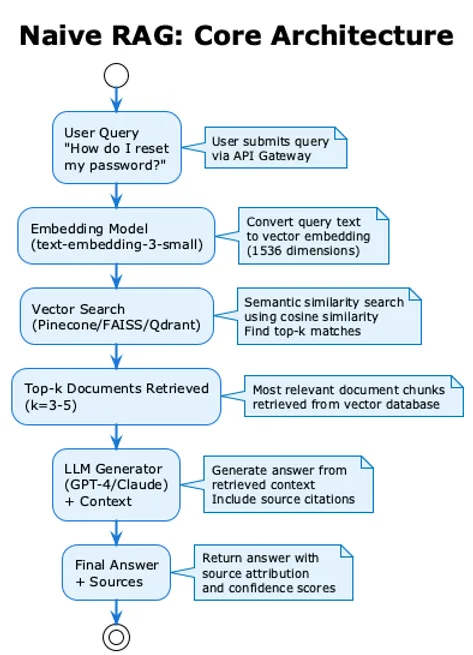
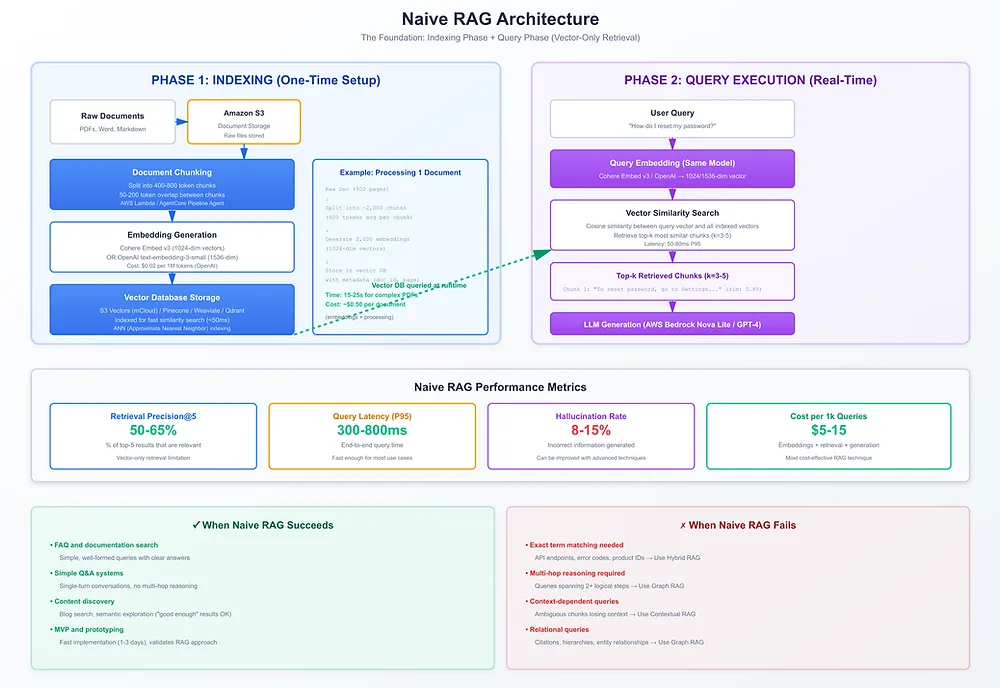
Visual Architecture:
The process flow diagram shows:
User query input
Embedding model processing
Vector search execution
Top-k document retrieval
LLM generation with context
Final answer with source citations
This architecture is remarkably simple—and that's its strength. You can build a working Naive RAG system in a weekend, deploy it in production, and start delivering value immediately.
How Naive RAG Works: The Three-Step Process
Step 1: Indexing (One-Time Setup)
Before queries can be answered, documents must be indexed. This happens once (or periodically as documents are updated):
Document Processing Flow:
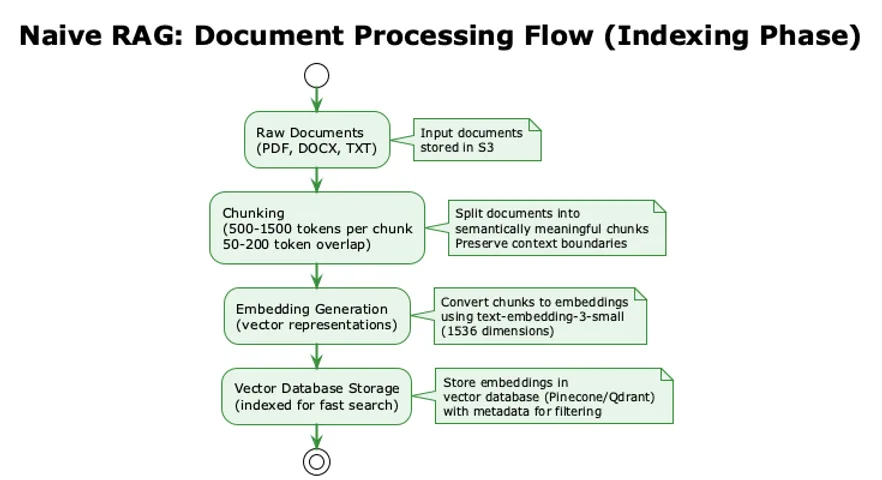
Visual Flow:
See process flow above showing:
Raw document ingestion
Chunking strategy (500-1500 tokens)
Embedding generation
Vector database storage
Chunking Strategy:
Size: 500-1500 tokens per chunk (balance between context and precision)
Overlap: 50-200 tokens between chunks (preserve context across boundaries)
Method: Fixed-size sliding window or semantic chunking (sentence-aware)
Embedding Generation:
Model: OpenAI text-embedding-3-small ($0.02 per 1M tokens) or text-embedding-3-large ($0.13 per 1M tokens)
Dimensions: 1536 (small) or 3072 (large)
Output: Dense vector representation capturing semantic meaning
Storage:
Vector Database: Pinecone, Weaviate, Qdrant, or FAISS
Metadata: Store document IDs, titles, timestamps alongside vectors
Indexing: Approximate Nearest Neighbor (ANN) indexes for sub-50ms search
Step 2: Retrieval (Query Time)
When a user submits a query, the system retrieves relevant documents:
Query Processing Flow:
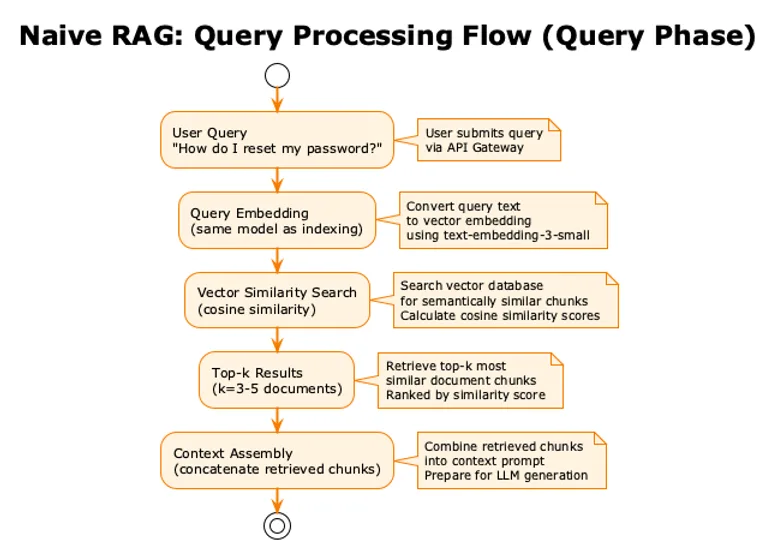
The process flow above shows:
User query input
Query embedding generation
Vector similarity search
Top-k result retrieval
Context assembly
Similarity Metrics:
Cosine Similarity: Most common, measures angle between vectors (0-1 scale)
Euclidean Distance: Alternative metric, less common for embeddings
Dot Product: Fast computation, requires normalized vectors
Retrieval Parameters:
k (top-k): Number of documents to retrieve (typically 3-5)
Score Threshold: Minimum similarity score (optional filtering)
Metadata Filtering: Filter by date, category, source (if needed)
Step 3: Generation (Query Time)
The retrieved context is passed to an LLM, which generates the final answer:
Generation Flow:
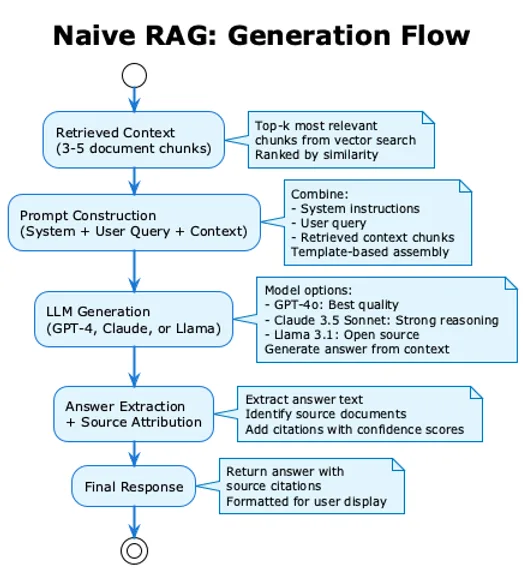
Prompt Template:
System: You are a helpful assistant. Answer questions using only the provided context.

Context:
[Retrieved Document 1]
[Retrieved Document 2]
[Retrieved Document 3]

User Query: [User's question]

Answer:
LLM Selection:
GPT-4o: Best quality, $5/$15 per 1M tokens (input/output), <200ms latency
Claude 3.5 Sonnet: Strong reasoning, $3/$15 per 1M tokens, 200k context window
Llama 3.1: Open source, free if self-hosted, good quality at lower cost
Real-World Performance: What to Expect
Based on industry benchmarks and production deployments, here's what Naive RAG delivers:
Performance Metrics
Metric | Typical Range | Notes |
Retrieval Precision@5 | 50-65% | Percentage of top-5 results that are relevant |
Answer Faithfulness | 70-80% | Answers grounded in retrieved context |
Answer Relevance | 70-80% | Answers address the query |
Hallucination Rate | 8-15% | Incorrect information generated |
Latency (p95) | 300-800ms | End-to-end query time |
Cost per 1k Queries | $5-15 | Embeddings + retrieval + generation |
Why These Numbers?
Precision Limitations:
Vector search finds semantically similar documents, not necessarily relevant ones
No keyword matching means exact terms (product IDs, error codes) can be missed
Chunk boundaries can split relevant information across multiple chunks
Faithfulness Challenges:
LLMs sometimes generate plausible-sounding answers not in the retrieved context
Ambiguous queries can lead to incorrect interpretations
Context window limits may truncate important information
Latency Sources:
Embedding generation: 50-150ms
Vector search: 20-100ms (depends on database and index size)
LLM generation: 200-600ms (depends on model and response length)
Cost Breakdown (per 1,000 queries)
Typical Configuration:
Embedding model: text-embedding-3-small
Vector database: Pinecone (managed)
LLM: GPT-4o
Cost Components:
Query Embeddings: $0.02 per 1M tokens ≈ $0.10 per 1k queries
Vector Database: $70/month starter plan ≈ $2.30 per 1k queries (at 30k queries/month)
LLM Generation: $5 per 1M input tokens + $15 per 1M output tokens ≈ $8-12 per 1k queries
Total: ~$10-15 per 1,000 queries
Scaling Considerations:
Costs scale linearly with query volume
Vector database costs are fixed (monthly subscription)
LLM costs dominate at high volumes (70-80% of total)
When Naive RAG Succeeds: Ideal Use Cases
Naive RAG excels in scenarios where queries are straightforward and documents are well-structured:
1. FAQ and Documentation Search
Use Case: Customer support chatbots, internal knowledge bases, product documentation
Why It Works:
Queries are typically simple and well-formed
Documentation is structured and comprehensive
Users expect direct answers, not complex reasoning
Real-World Example: Stripe's internal documentation search handles 10,000+ queries/day from engineers. Queries like "How do I create a payment intent?" or "What are the API rate limits?" are answered accurately 70% of the time with Naive RAG, with median latency of 450ms.
Success Metrics:
70%+ first-contact resolution
<500ms response time
75%+ user satisfaction
2. Simple Q&A Systems
Use Case: Product Q&A, knowledge base search, FAQ bots
Why It Works:
Single-turn conversations (no multi-hop reasoning needed)
Clear question-answer pairs in source documents
Semantic similarity captures user intent effectively
Real-World Example: A SaaS company's customer support bot answers 60% of common questions using Naive RAG on their 500-page documentation. The system handles 2,000 queries/day with 72% accuracy, reducing support ticket volume by 40%.
3. Content Discovery
Use Case: Blog search, article recommendations, content discovery
Why It Works:
Users search by topic or concept (semantic search excels)
No exact term matching required
"Good enough" results are acceptable
Real-World Example: A media company uses Naive RAG to help readers discover related articles. Users searching for "climate change solutions" find semantically related content even if those exact words aren't in article titles. Engagement increased 35% after implementation.
4. MVP and Prototyping
Use Case: Rapid prototyping, proof-of-concept, early-stage products
Why It Works:
Fast to implement (1-3 days)
Low cost (can start for <$100/month)
Validates RAG approach before investing in advanced techniques
Real-World Example: A startup built a Naive RAG prototype in 48 hours to validate their idea. After 2 weeks of testing with 500 users, they confirmed RAG solved their problem. They then invested in Hybrid RAG for production, but Naive RAG proved the concept.
Success Criteria Checklist
Naive RAG is a good fit if:
✅ Queries are straightforward (single concept, no multi-step reasoning)
✅ Documents are well-structured and comprehensive
✅ Latency requirements are flexible (<1 second acceptable)
✅ 60-70% accuracy is sufficient for your use case
✅ Budget is constrained (<$10k/month for moderate traffic)
✅ You need to deploy quickly (days, not weeks)
When Naive RAG Fails: Understanding Limitations
Naive RAG struggles with queries that require:
1. Exact Term Matching
Problem: Vector search finds semantically similar documents but misses exact terms.
Example Query: "Find documentation for API endpoint /v2/users/create"
What Happens:
Vector search might retrieve docs about "/api/user/new" (semantically similar)
But user wants the exact endpoint "/v2/users/create"
Result: Wrong documentation retrieved
Solution: Hybrid RAG (combines keyword + vector search)
2. Multi-Hop Reasoning
Problem: Queries requiring multiple reasoning steps can't be answered with single-pass retrieval.
Example Query: "What companies did our Q3 2024 acquisition target partner with in Europe?"
What's Required:
Find Q3 2024 acquisition announcement
Identify the target company name
Search for that company's European partnerships
What Happens:
Naive RAG retrieves docs mentioning "Q3 2024 acquisition" OR "European partnerships"
But can't connect these concepts across documents
Result: Incomplete or incorrect answer
Solution: Graph RAG or Agentic RAG (multi-step reasoning)
3. Context-Dependent Queries
Problem: Chunked documents lose context, making ambiguous references unclear.
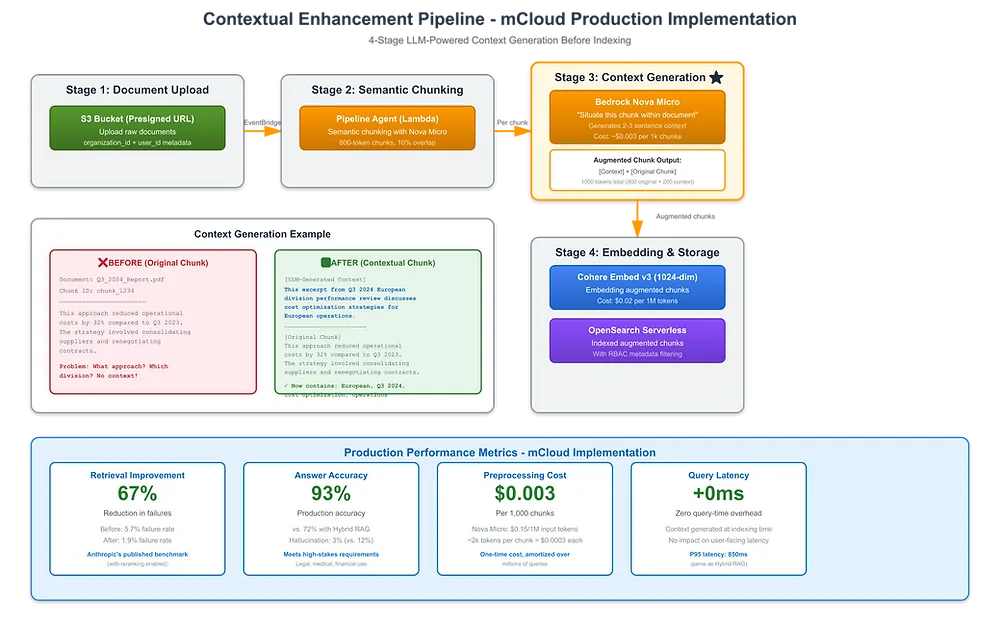
Example Document Chunk: "This approach reduced operational costs by 32% compared to Q3 2023."
Problem: What is "this approach"? The chunk doesn't contain the context.
What Happens:
User asks: "What approach reduced costs?"
Naive RAG retrieves the chunk but can't explain what "this approach" refers to
Result: Incomplete answer
Solution: Contextual RAG (preprocesses chunks with LLM-generated context)
4. Relational Queries
Problem: Queries requiring understanding of relationships between entities.
Example Query: "What legal cases cited by the 2023 Supreme Court ruling on data privacy were later overturned?"
What's Required:
Understanding citation relationships
Temporal reasoning (what happened after)
Entity relationship mapping
What Happens:
Naive RAG retrieves relevant documents but can't trace citation chains
Result: Can't answer the query accurately
Solution: Graph RAG (knowledge graph integration)
Failure Mode Indicators
Watch for these signs that Naive RAG isn't sufficient:
❌ Low precision: <50% of retrieved documents are relevant
❌ High hallucination: >15% of answers contain incorrect information
❌ User complaints: "It didn't find the right document" or "The answer was wrong"
❌ Multi-step queries failing: Users need to ask follow-up questions to get complete answers
❌ Exact term searches failing: Product IDs, error codes, API endpoints not found
The Technology Stack: Building Your First System
Vector Databases
Managed Options (Recommended for Start):
Database | Strengths | Pricing | Best For |
Pinecone | Sub-50ms queries, auto-scaling, managed | $70/month starter (100k vectors) | Production deployments, scale |
Weaviate | Open source + cloud, hybrid search built-in | Free (self-hosted) or $25/month cloud | Flexibility, hybrid search |
Qdrant | High performance, Rust-based, open source | Free (self-hosted) or $19/month cloud | Performance, cost-conscious |
Chroma | Developer-friendly, embedded mode | Free (open source) | Prototyping, small scale |
Self-Hosted Options:
Database | Strengths | Considerations |
FAISS | Fastest for <1M vectors, in-memory | Requires server management, no persistence |
Milvus | Scalable, production-ready | Complex setup, requires Kubernetes |
Weaviate | Full-featured, good documentation | Resource-intensive |
Embedding Models
Commercial (Recommended):
Model | Dimensions | Cost (per 1M tokens) | Quality | Best For |
text-embedding-3-small | 1536 | $0.02 | Excellent | Most use cases, cost-conscious |
text-embedding-3-large | 3072 | $0.13 | Best | High-accuracy requirements |
text-embedding-ada-002 | 1536 | $0.10 | Good | Legacy, being phased out |
Open Source (Privacy-Sensitive):
Model | Dimensions | Cost | Quality | Best For |
sentence-transformers/all-MiniLM-L6-v2 | 384 | Free | Good | Small scale, privacy |
sentence-transformers/all-mpnet-base-v2 | 768 | Free | Very Good | Self-hosted, privacy |
Orchestration Frameworks
LangChain (Most Popular):
Strengths: 80k+ GitHub stars, extensive integrations, active community
Best For: Complex workflows, production systems, integration-heavy projects
Learning Curve: Moderate (comprehensive but can be overwhelming)
LlamaIndex (Document-Focused):
Strengths: 30k+ stars, document-centric, gentler learning curve
Best For: Data ingestion, document-heavy applications, simpler workflows
Learning Curve: Easier (more focused API)
Direct API Calls:
Strengths: No framework overhead, maximum control, simple use cases
Best For: Prototypes, simple systems, learning RAG fundamentals
Learning Curve: Low (but more manual work)
LLM Providers
Commercial (Recommended):
Provider | Model | Cost (per 1M tokens) | Context Window | Best For |
OpenAI | GPT-4o | $5/$15 (in/out) | 128k | Best quality, fastest |
Anthropic | Claude 3.5 Sonnet | $3/$15 (in/out) | 200k | Strong reasoning, long context |
Gemini 1.5 Pro | $1.25/$5 (in/out) | 1M+ | Long documents, multimodal |
Open Source (Self-Hosted):
Model | Parameters | Context Window | Best For |
Llama 3.1 | 8B/70B | 128k | Cost-conscious, privacy |
Mistral 7B | 7B | 32k | Fast inference, lower cost |
Migration Path: When to Move Beyond Naive RAG
Signs It's Time to Upgrade
Performance Indicators:
Retrieval precision consistently <50%
Hallucination rate >15%
User satisfaction <70%
Frequent complaints about wrong answers
Query Complexity Indicators:
Users need multiple follow-up questions to get complete answers
Queries requiring exact term matching failing
Multi-step reasoning queries failing
Relational queries (citations, hierarchies) failing
Business Indicators:
Accuracy requirements increasing (regulatory, high-stakes)
Query volume scaling (cost optimization needed)
New use cases requiring advanced capabilities
Migration Options
1. Hybrid RAG (Most Common Next Step)
When: Need better precision, exact term matching
Cost Increase: ~60% ($8-20 per 1k queries vs $5-15)
Benefit: 15-20% precision improvement
2. Contextual RAG
When: High-stakes accuracy requirements, ambiguous chunks
Cost Increase: ~100% ($12-30 per 1k queries)
Benefit: 67% reduction in retrieval failures (Anthropic benchmark)
3. Graph RAG
When: Relational queries, multi-hop reasoning needed
Cost Increase: ~200% ($20-60 per 1k queries)
Benefit: 80-85% accuracy on complex queries (vs 45-50% vector-only)
4. Agentic RAG
When: Complex research, autonomous workflows, highest accuracy needed
Cost Increase: ~300-500% ($30-150 per 1k queries)
Benefit: 78% error reduction, 90%+ on hard queries
How mCloud Runs RAG in Production
Serverless Pipeline Architecture: mCloud's RAG implementation uses AWS Bedrock AgentCore agents and Lambda functions, eliminating all EC2 instances while delivering enterprise-scale performance. The pipeline processes documents event-driven without any manual intervention.
Document Ingestion Pipeline:
Direct S3 Upload Pattern: Frontend generates presigned S3 URLs for direct upload (bypassing Lambda 6MB limits), enabling faster uploads and reducing Lambda costs by ~60% compared to proxy uploads
Event-Driven Processing: S3 events → EventBridge → SQS FIFO (deduplication) → Lambda bridge → AgentCore Pipeline Agent
Processing Steps:
Document validation (file type, size, malware scanning)
Multi-format extraction (20+ formats: PDF, Word, Excel, images with OCR, JSON, Markdown)
Intelligent chunking (Nova Micro model, 400-800 tokens per chunk with 50-200 token overlap)
Contextual enhancement (LLM adds document context to each chunk)
Embedding generation (Cohere Embed v3 for balanced quality/cost)
S3 vector storage with processing metadata
Latency: 15-25s for complex PDFs, <5s for simple documents
Reliability: SQS provides automatic retry with exponential backoff for failed processing
Query Execution Path:
API Gateway Entry: HTTP API with request validation, rate limiting (2000 req/5min per IP), and CORS protection
Authentication Layer: JWT validation in Chat Proxy Lambda with organization/user scope validation
RBAC Enforcement: Project-based filtering (DynamoDB stores project memberships, vector searches filter by project_id)
Query Processing:
Query embedding (Cohere Embed v3 same model as indexing)
Vector similarity search (S3 stored vectors, filtered by project_id)
Top-k retrieval (k=3-5 chunks, similarity >70%)
Answer generation (Nova Lite primary, Claude Haiku fallback)
Citation extraction with confidence scores
Real-Time Streaming: Word-by-word streaming via AWS Bedrock streaming API (<1s first token, <30s P95 full response)
Production Optimization Strategies:
Chunking Optimization: 400-800 token chunks (not larger/smaller) maximize context while minimizing embedding costs
Embedding Selection: Cohere Embed v3 balances quality (vs. OpenAI) with cost efficiency
Cost Tracking: Real-time metrics per document/organization, CloudWatch dashboards, automatic alerts at usage thresholds
Multi-Tenant Architecture: Organization_id + user_id properties on all data for secure isolation
Performance Monitoring: CloudWatch metrics track p95 latency (300-500ms first token), vector search performance (50-80ms), and error rates
Cost Breakdown per 1k Queries:
Query embeddings: $0.02 per 1M tokens (~$0.10)
Vector storage/search: $70/month baseline (~$2.33 per 1k queries)
Answer generation (Nova Lite): $5/$15 in/out per 1M tokens (~$10-20)
Total: $12-23 per 1,000 queries (3x more cost-effective than fine-tuning approaches)
Why Naive RAG Scales at mCloud: The three-step loop (embed → retrieve → generate) matches our serverless architecture perfectly. Customers can prototype locally with the same AgentCore agents, then deploy to production without architectural changes.
Architecture Diagrams
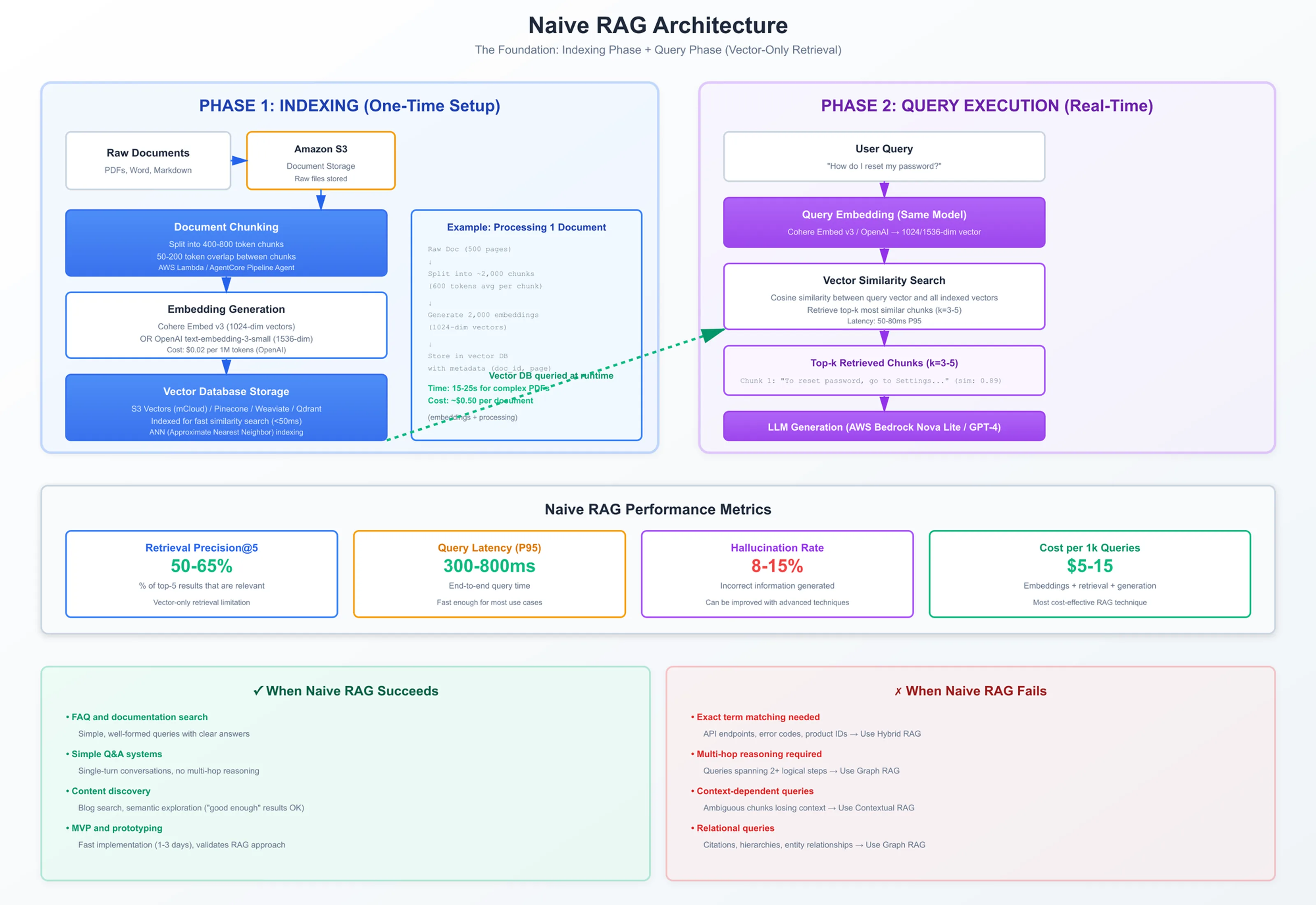
Complete Naive RAG Architecture:
See the diagram above for the complete two-phase flow (indexing + query execution) with AWS services and performance metrics
Detailed Document Processing Pipeline:
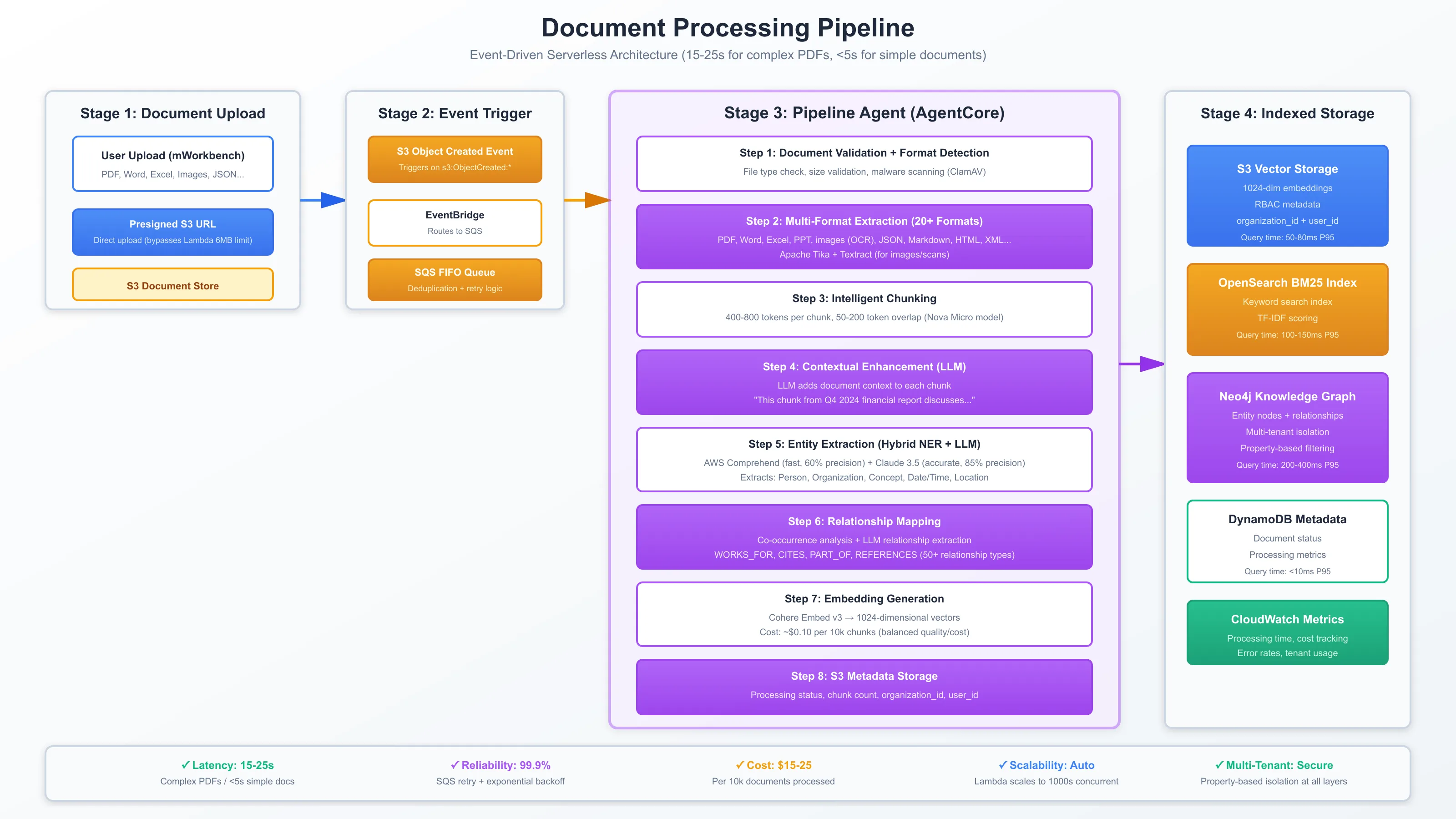
See Document Processing Pipeline for the full 8-step serverless processing pipeline from S3 upload to indexed storage
System Architecture Overview:
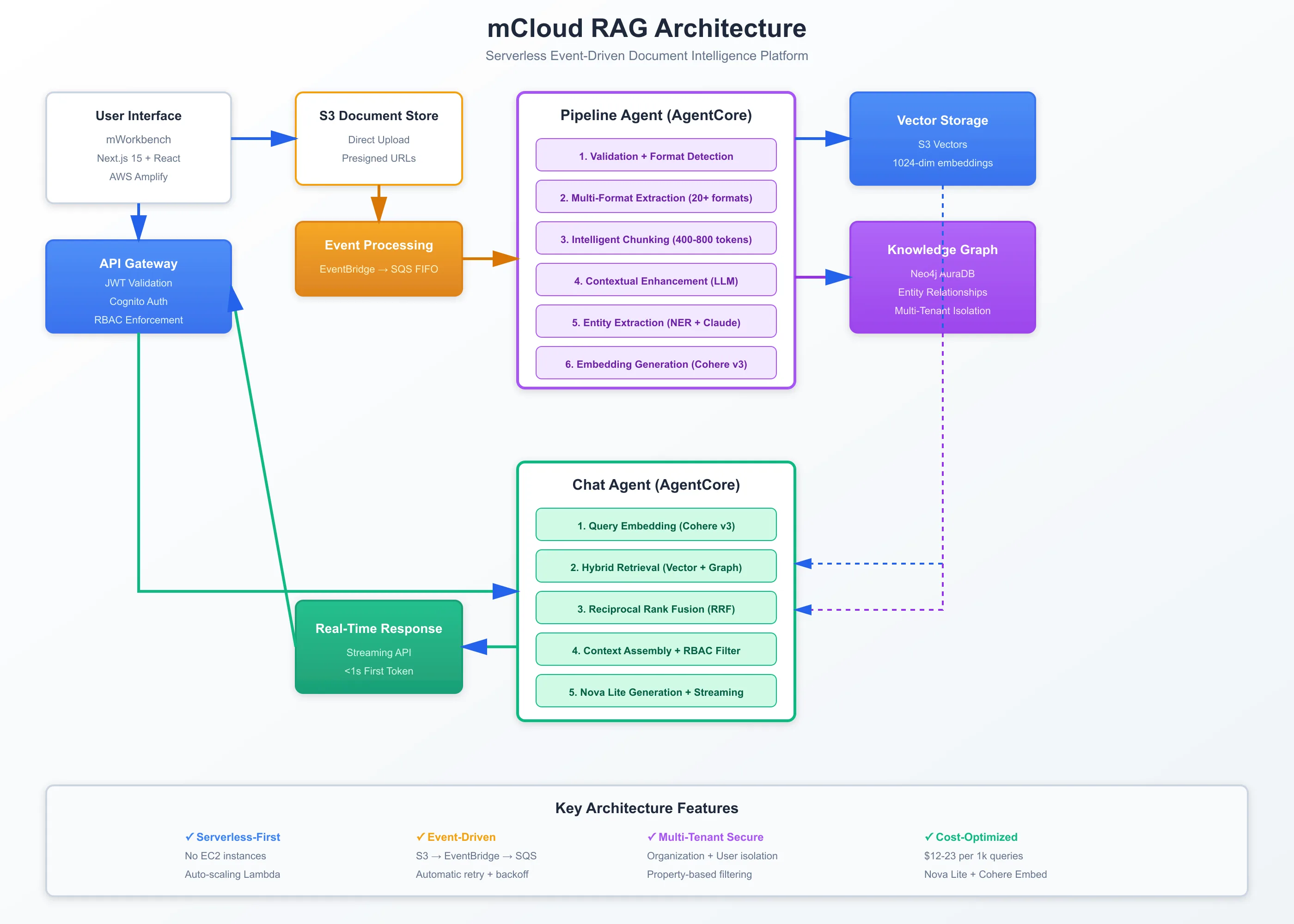
See mCloud RAG Architecture for the complete mCloud RAG system architecture showing all AWS services and data flow
These diagrams follow AWS architecture best practices with bright, high-resolution styling suitable for technical documentation and blog publication.
Conclusion: Start Simple, Scale Smart
Naive RAG is where every organization's RAG journey begins—and for good reason. It's fast to implement, inexpensive to operate, and sufficient for a surprising number of use cases.
Key Takeaways:
Start with Naive RAG: Don't over-engineer from day one. Build a working system first, validate that RAG solves your problem, then optimize.
Know Your Limits: Naive RAG excels at simple Q&A, documentation search, and content discovery. It struggles with exact terms, multi-hop reasoning, and relational queries.
Measure Performance: Track precision, faithfulness, hallucination rate, and user satisfaction. These metrics will tell you when it's time to upgrade.
Plan Your Migration: When you hit Naive RAG's limitations, you have clear paths forward—Hybrid RAG for precision, Contextual RAG for accuracy, Graph RAG for reasoning, Agentic RAG for complexity.
Cost-Conscious Scaling: Naive RAG costs $5-15 per 1,000 queries. Advanced techniques cost 2-10x more. Make sure the accuracy gains justify the cost increase.
The SaaS company that built their support bot in a weekend? They're still using Naive RAG today, handling 5,000 queries/day with 72% accuracy. They've optimized chunking, tuned retrieval parameters, and added simple re-ranking—but they haven't needed to migrate to advanced techniques.
Your first RAG system doesn't need to be perfect. It just needs to work.
Start with Naive RAG. Validate your approach. Then scale smart based on what you learn.