Building Your First MLOps Pipeline: A Practical Step-by-Step Guide
The Weekend That Changed Everything
What this covers
- The Weekend That Changed Everything
- The Six-Step Pipeline Architecture
- Step 1: Data Ingestion & Validation
- Step 2: Data Preprocessing & Feature Engineering
- Step 3: Model Training & Experiment Tracking
- Step 4: Model Evaluation & Validation
- Step 5: Model Deployment & Serving
- Step 6: Monitoring & Feedback
- The Cloud-Agnostic Alternative: Kubernetes + Argo
- Your First Pipeline: The 30-Day Build Plan
- How mCloud Technology Can Help
- Conclusion
- References & Further Reading
"The first pipeline is never perfect. But a working pipeline you can improve beats a perfect design you'll never finish. Start simple, automate relentlessly, and iterate based on what breaks."
The Weekend That Changed Everything
Sarah, a senior data scientist at a mid-sized e-commerce company, spent her Friday afternoon the same way she'd spent dozens of Fridays over the past year: manually deploying a model update.
The ritual was familiar: download the latest customer behavior data from three different databases, run her preprocessing notebook (hoping the cell execution order was correct), train the model overnight, manually check the results Saturday morning, email the pickle file to the engineering team, and wait for them to update the production endpoint sometime next week.
This time was different. The engineering team was at a conference. They wouldn't be back until Wednesday.
"I can't wait five days," Sarah thought. "What if I could just... push a button?"
That weekend, she built her first automated ML pipeline. It wasn't perfect—far from it. But on Monday morning, instead of emailing pickle files, she committed her model training code to Git and watched as her pipeline automatically:
Fetched and validated the latest data
Trained the model with tracked experiments
Evaluated performance against the baseline
Deployed to a staging environment for testing
Generated a deployment report for the engineering team
Total time from code commit to staged model: 47 minutes.
That weekend project evolved into her company's standard MLOps platform, now serving 30 data scientists and deploying 50+ models. Sarah eventually left to join an ML platform startup, but her first pipeline—with many improvements—still runs in production today.
This article is the guide Sarah wish she'd had that weekend.
The Six-Step Pipeline Architecture
From Lifecycle to Pipeline: How the Phases Connect
In Part 1 - MLOps Fundamentals, we introduced the Model Development Lifecycle—Six Phases that Matter, which describes how machine learning systems evolve from data collection to continuous improvement.
In Part 2, we zoom in on how those same lifecycle phases translate into an automated six-step pipeline. Each pipeline step is the repeatable, operational unit inside one or more lifecycle phases.
In other words: the lifecycle defines the "what", the pipeline defines the "how."
Mapping Lifecycle Phases to Pipeline Steps
Model Development Lifecycle Phase (Part 1) | MLOps Pipeline Step (Part 2) | Relationship |
1. Data Collection & Preparation | → Step 1: Ingest & Validate → Step 2: Preprocess & Engineer Features | The first lifecycle phase corresponds directly to the first two pipeline steps—automating data access, validation, and feature creation. |
2. Model Development | → Step 3: Train Model | "Model Development" in the lifecycle becomes the training and experiment-tracking stage in the pipeline. |
3. Model Evaluation & Validation | → Step 4: Evaluate & Validate | Both use the same terminology—in the pipeline, this phase is formalized through promotion gates and metrics automation. |
4. Model Deployment | → Step 5: Deploy to Production | The lifecycle's deployment phase maps cleanly to this single automated pipeline step (containerization, CI/CD, serving). |
5. Model Monitoring & Maintenance | → Step 6: Monitor & Feedback | Continuous monitoring and retraining close the loop; the pipeline version executes this as ongoing scheduled or triggered runs. |
6. Governance & Continuous Improvement | ↔ All Steps (cross-cutting) | Governance overlays every step—ensuring reproducibility, fairness, lineage, and compliance across the entire automated pipeline. |
Key Takeaway: The Six Phases of the Model Development Lifecycle form the macro view of MLOps—how models mature from data collection to continuous improvement. The Six Steps of the MLOps Pipeline form the micro view—how those same activities are executed automatically, monitored, and repeated. Together, they transform machine learning from a one-off experiment into a sustainable, production-grade capability.
Before diving into implementation details, let's visualize what we're building. An MLOps pipeline is a sequence of automated steps that transform raw data into production-ready predictions:

Each step has a specific purpose, and each step can fail (and should fail safely):
Step | Input | Output | Can Fail Because... |
1. Ingest & Validate | Raw data sources | Validated datasets | Schema mismatch, missing data, outliers |
2. Preprocess & Features | Validated data | Feature matrix | Encoding errors, missing values, drift |
3. Train Model | Features + labels | Trained model artifact | Training divergence, poor convergence |
4. Evaluate | Trained model + test set | Metrics + approval decision | Below threshold, fairness violations |
5. Deploy | Approved model | Production endpoint | Integration failures, resource limits |
6. Monitor | Production predictions | Alerts + retraining triggers | Drift, performance degradation |
The Philosophy: Each step is a contract. If a step succeeds, the next step can trust its output. If a step fails, the pipeline stops and alerts the team—no bad data or underperforming models slip through.
Let's build this pipeline step by step, using a real-world example: a customer churn prediction model for a subscription business.
Step 1: Data Ingestion & Validation
The Problem: Garbage In, Garbage Out
In 2019, a ride-sharing company discovered their surge pricing model was making bizarre predictions—charging $200 for a 2-mile ride in suburban neighborhoods. After weeks of investigation, they found the root cause: a data ingestion bug had swapped latitude and longitude columns for 15% of trips.
The model trained perfectly on this corrupted data. The evaluation metrics looked fine. The bug only surfaced in production when customers complained.
The lesson: Data validation isn't optional—it's the firewall between your pipeline and disaster.
What Data Validation Catches
Modern data validation frameworks check for three critical layers:
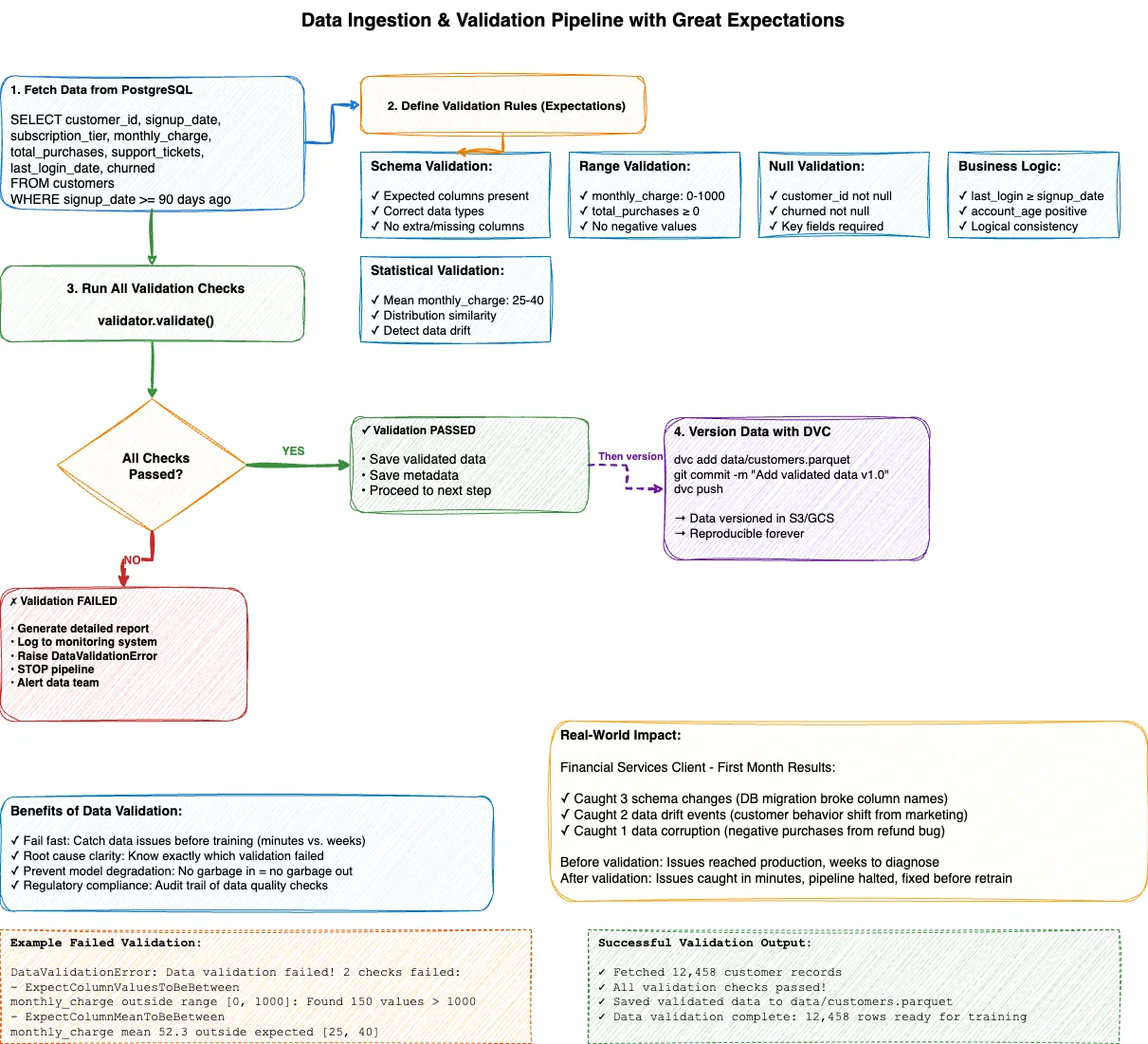
1. Schema Validation
Expected columns present (no missing customer_id or purchase_date)
Correct data types (age is numeric, not string)
Expected value ranges (age between 18-120, not negative)
2. Statistical Validation
Distribution hasn't shifted dramatically (detecting data drift)
No unexpected spikes in null values
Outliers within reasonable bounds
3. Business Logic Validation
Customer lifetime value isn't negative
Purchase dates aren't in the future
Account ages match registration dates
How It Works
The implementation uses Great Expectations, the industry standard for data validation in ML pipelines. The system:
Connects to data sources (databases, data warehouses, cloud storage)
Defines validation rules (expectation suites covering all three layers)
Runs automated checks every time new data arrives
Generates detailed reports showing exactly what passed or failed
Stops the pipeline if any critical validation fails
Tools: Great Expectations, DVC (Data Version Control)
Real-World Impact
A financial services client implemented this validation framework. In the first month, it caught:
3 schema changes (database migration broke column names)
2 data drift events (customer behavior shifted due to marketing campaign)
1 data corruption bug (negative purchase amounts from refund processing error)
Before validation: These issues reached production, causing model performance degradation that took weeks to diagnose.
After validation: Issues caught within minutes, pipeline halted, team notified, problem fixed before any model retrained.
Step 2: Data Preprocessing & Feature Engineering
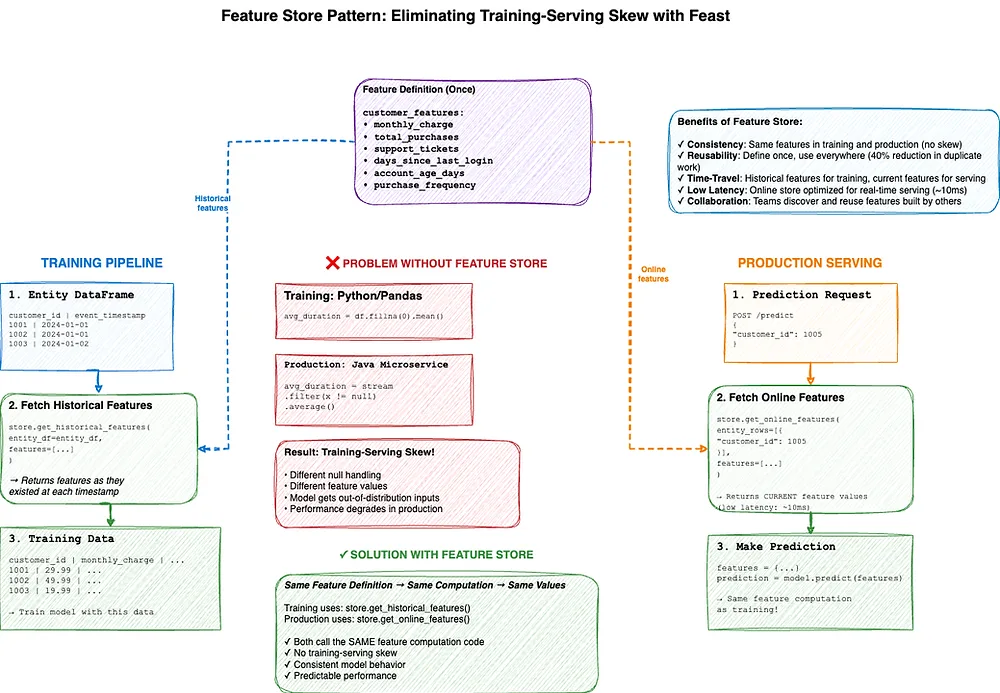
The Problem: Training-Serving Skew
An online retailer built a product recommendation model that achieved 92% accuracy in offline evaluation—impressive! But when deployed to production, click-through rates actually decreased by 15%.
The culprit? Training-serving skew.
During training, they computed the feature avg_user_session_duration using Python's pandas library. In production, the feature was computed by a Java microservice. The two implementations handled edge cases differently:
Python: Treated null sessions as 0 seconds
Java: Excluded null sessions from the average
This subtle difference meant the production model received different feature distributions than it was trained on. The model, confused by out-of-distribution inputs, made poor predictions.
The solution: Compute features the same way in training and production. This is what feature stores solve.
What Feature Stores Provide
A feature store is a centralized repository for feature definitions, computation, and serving. Think of it as a "database for ML features" with special properties:
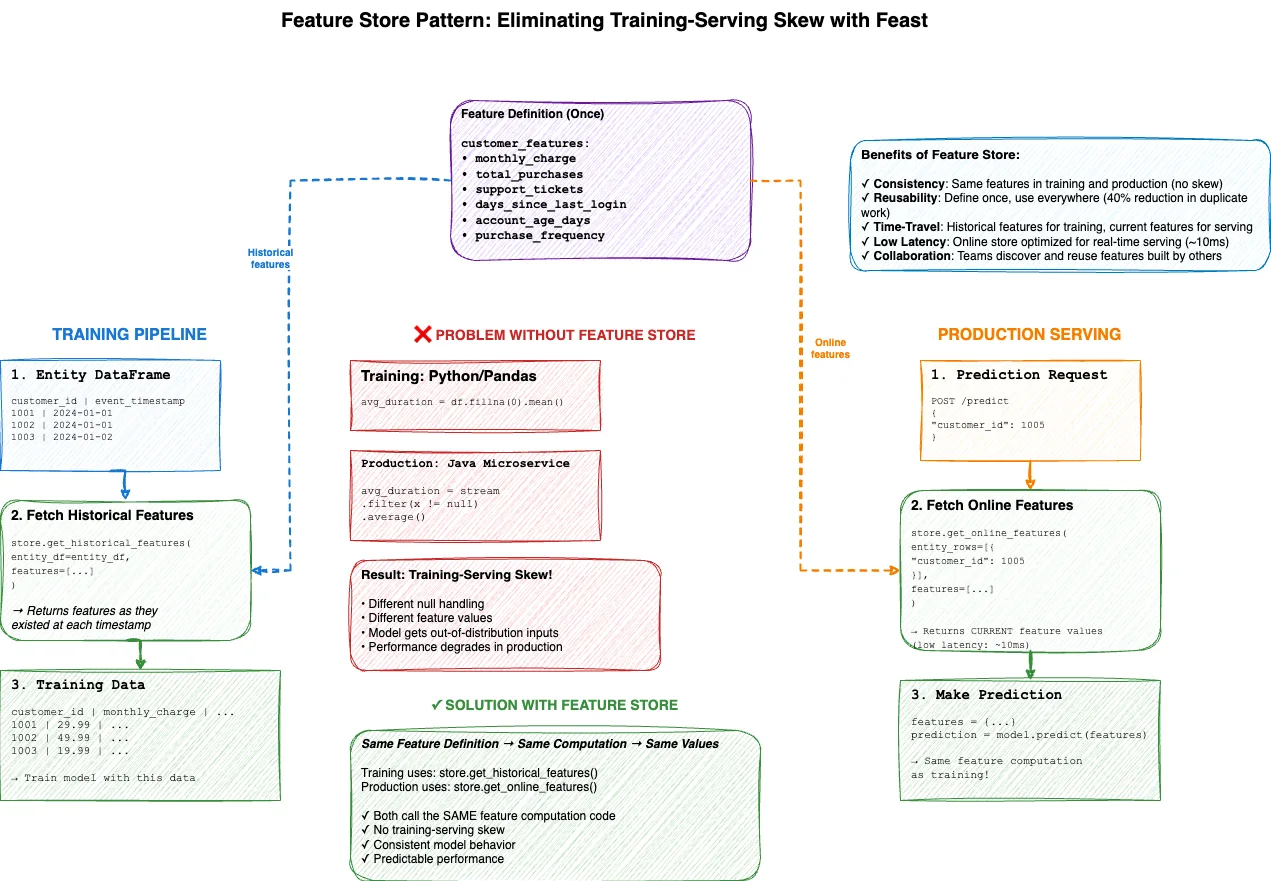
1. Single Source of Truth
Define feature once: customer_lifetime_value
Use everywhere: training, batch inference, online serving
2. Consistency
Same code computes features for training and production
Eliminates training-serving skew
3. Reusability
Team A builds customer_recency_score
Team B discovers and reuses it for their model
40% reduction in duplicate feature engineering (our client data)
4. Time-Travel
Training needs historical features: "What was customer LTV on June 15, 2023?"
Production needs current features: "What is customer LTV right now?"
Feature store handles both
How It Works
The implementation uses Feast, the most popular open-source feature store. The system:
Define features once in a centralized repository
Materialize features for training (historical point-in-time joins)
Serve features for production predictions (low-latency online serving)
Version features automatically (track changes over time)
Monitor feature quality (detect drift and anomalies)
For our churn prediction example, features include:
monthly_charge (subscription price)
total_purchases (lifetime purchase count)
days_since_last_login (recency metric)
purchase_frequency (purchases per month)
support_tickets (customer service interactions)
Tools: Feast (open-source), Tecton (commercial alternative)
Business Impact
A SaaS company implemented a feature store and saw:
60% reduction in time to build new models (feature reuse)
Zero training-serving skew incidents (down from 3-5 per quarter)
40% faster experimentation (data scientists access pre-computed features)
Step 3: Model Training & Experiment Tracking
The Problem: "Which Hyperparameters Worked Best?"
A data science team at a fintech company ran 200+ experiments over 3 months optimizing a loan approval model. They tracked experiments in a shared spreadsheet.
By month two, chaos emerged:
Duplicate experiment IDs
Missing hyperparameters ("What learning rate did we use for experiment 47?")
No model artifacts saved ("Where's the model from experiment 82?")
Conflicting notes from different team members
When they finally selected the best model, they couldn't reproduce it. The hyperparameters were documented, but the dataset version wasn't. After a week of trial-and-error, they eventually recreated something close—but were never certain it was identical.
The solution: Automated experiment tracking that logs everything automatically.
How It Works
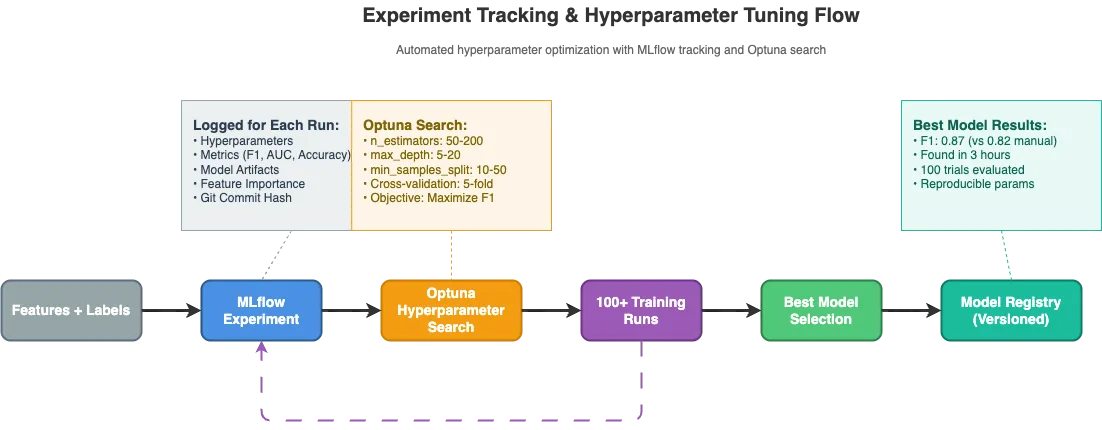
The implementation uses MLflow, the de facto standard for ML experiment tracking, combined with Optuna for automated hyperparameter search. The system:
1. Automated Experiment Logging
Every training run gets a unique ID
All hyperparameters logged automatically (n_estimators, max_depth, learning_rate, etc.)
All metrics logged (accuracy, F1 score, AUC, precision, recall)
Model artifacts saved (trained model files)
Feature importance plots generated
Git commit hash recorded (code reproducibility)
Timestamps tracked (start time, end time, duration)
2. Hyperparameter Optimization
Define search space (e.g., "max_depth between 5-20")
Optuna tests 100+ combinations automatically
Uses cross-validation for robust performance estimates
Finds best hyperparameters based on target metric (F1 score)
Entire process runs in hours instead of weeks
3. Experiment Comparison
Visual dashboard shows all experiments
Compare metrics side-by-side
Download any model artifact
Reproduce any experiment exactly
Tools: MLflow (experiment tracking), Optuna (hyperparameter tuning)
Business Impact
A healthcare client used automated hyperparameter tuning for a patient readmission model:
Manual tuning: 0.82 F1 score over 2 weeks
Automated tuning: 0.87 F1 score in 3 hours
That 6% improvement translated to identifying 400 additional at-risk patients per month.
Step 4: Model Evaluation & Validation
The Problem: Accuracy Isn't Enough
An insurance company built a claims fraud detection model with 95% accuracy. Leadership celebrated. They deployed it to production.
Within a week, customer complaints flooded in. Legitimate claims were being flagged as fraud at alarming rates. The business team demanded the model be rolled back.
What happened?
The dataset was imbalanced: 98% legitimate claims, 2% fraudulent. A model that predicts "legitimate" for every claim achieves 98% accuracy—but catches zero fraud.
Their 95% accurate model was barely better than this naive baseline. It had high accuracy but terrible recall (only catching 30% of actual fraud) and poor precision (80% of fraud flags were false positives).
The lesson: Evaluate models on multiple dimensions, not just accuracy.
Multi-Dimensional Evaluation Framework
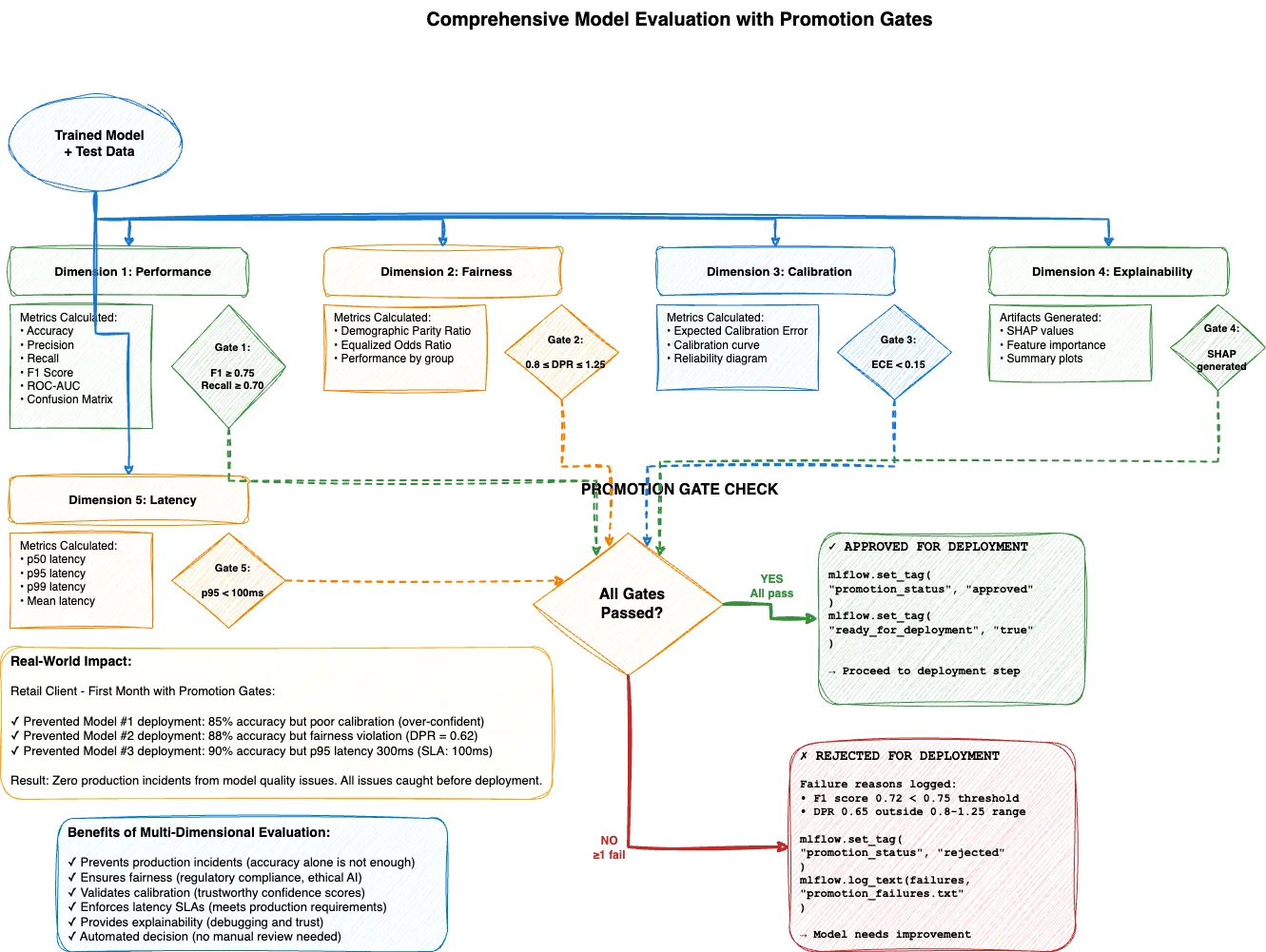
Modern MLOps evaluates models across six dimensions:
Dimension | What We Measure | Why It Matters |
Performance | Accuracy, Precision, Recall, F1, AUC-ROC | Does it solve the problem? |
Fairness | Demographic parity, Equal opportunity | Does it treat all groups fairly? |
Robustness | Performance on edge cases and adversarial examples | Does it fail gracefully? |
Calibration | Predicted probabilities vs. actual outcomes | Are confidence scores trustworthy? |
Explainability | SHAP values, feature importance | Can we explain decisions? |
Latency | p50, p95, p99 inference time | Is it fast enough for production? |
How It Works
The implementation creates an automated evaluation system that:
1. Performance Evaluation
Calculate 5 key metrics (accuracy, precision, recall, F1, AUC)
Generate confusion matrix
Create detailed classification report
Log everything to MLflow
2. Fairness Evaluation
Check demographic parity ratio (should be between 0.8-1.25)
Check equalized odds ratio
Identify if model treats different groups unfairly
Flag violations before deployment
3. Calibration Evaluation
Calculate Expected Calibration Error (ECE)
Generate calibration curve (predicted vs actual probabilities)
Ensure confidence scores are trustworthy
Alert if model is over-confident or under-confident
4. Explainability Evaluation
Generate SHAP explanations (why did the model make this prediction?)
Rank feature importance
Provide human-readable explanations
Support regulatory compliance
5. Latency Evaluation
Benchmark p50, p95, p99 inference times
Check against SLA requirements (e.g., p95 < 100ms)
Identify performance bottlenecks
6. Promotion Gates
Automated pass/fail decision
Model must meet ALL thresholds to deploy
Failed models rejected with detailed explanation
Tools: Scikit-learn (metrics), Fairlearn (fairness), SHAP (explainability), Prometheus (latency)
Business Impact
A retail client implemented this evaluation framework. In the first month, it prevented 3 model deployments that would have caused production issues:
Model #1: 85% accuracy but poor calibration (over-confident predictions)
Model #2: 88% accuracy but violated fairness threshold (discriminated by customer tier)
Model #3: 90% accuracy but p95 latency 300ms (exceeded SLA)
All three issues were caught before deployment, saving the team from production incidents and potential regulatory scrutiny.
Step 5: Model Deployment & Serving
The Problem: The Deployment Gap
A fintech startup had everything right: validated data, feature store, experiment tracking, comprehensive evaluation. Their models consistently passed all promotion gates.
But it still took 2-3 weeks to get a model from "approved" to "serving production traffic."
The bottleneck? Manual deployment.
Their deployment process required:
Data scientist exports model artifact
Email to ML engineering team
Engineer wraps model in Flask API
DevOps team provisions infrastructure
Security review
Manual testing in staging
Production deployment during maintenance window
By the time a model reached production, it was already stale—trained on 3-week-old data.
The solution: Automated deployment pipelines that go from "model approved" to "production traffic" in minutes, not weeks.
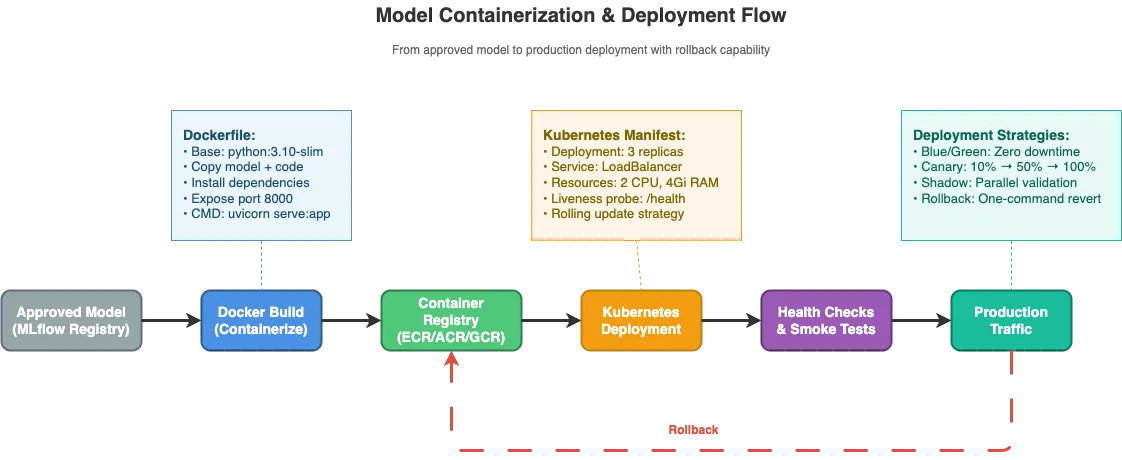
Containerization: The Foundation of Automated Deployment
Modern ML deployment uses containers (Docker) to package models with all their dependencies. A container is a lightweight, portable environment that runs identically everywhere—laptop, staging, production.
How It Works
1. Containerization
Package model with all dependencies (Python libraries, system tools)
Create Dockerfile (recipe for building container)
Build container image (one-time process)
Push to container registry (ECR, ACR, GCR)
2. Kubernetes Deployment
Deploy container to Kubernetes cluster
Configure replicas (typically 3+ for high availability)
Set resource limits (CPU, memory, GPU)
Define health checks (is the container healthy?)
Configure load balancing (distribute traffic evenly)
3. API Serving
FastAPI or similar framework serves predictions
Health check endpoint for monitoring
Metrics endpoint for observability
Authentication and rate limiting
4. Deployment Strategies
Blue/Green Deployment:
Run two identical environments (blue and green)
Deploy new version to inactive environment
Test thoroughly, then switch traffic instantly
One-command rollback if issues arise
Zero downtime
Canary Deployment:
Deploy new version to small subset (10% of traffic)
Monitor performance and errors
Gradually increase (10% → 50% → 100%)
Roll back immediately if metrics degrade
Shadow Deployment:
Deploy new version alongside old version
Send traffic to both, but only return old version's responses
Compare predictions without risk
Validate new model behavior in production environment
Tools: Docker (containers), Kubernetes (orchestration), FastAPI (serving), Prometheus (monitoring)
Business Impact
An e-commerce company automated their deployment process:
Before: 2-3 weeks from approved model to production
After: 47 minutes from approved model to production
Result: 30x faster time-to-value, models stay fresh, competitive advantage
Step 6: Monitoring & Feedback
The Problem: Silent Model Degradation
An e-commerce company deployed a product recommendation model that achieved 85% click-through rate in testing. For the first month in production, it maintained this performance.
Then, slowly, performance began degrading. By month three, CTR had dropped to 62%—a 27% decline.
No one noticed for weeks. The model was still running, latency was fine, error rates were normal. But the model was making progressively worse predictions.
What happened?
Customer behavior had shifted (pandemic-driven changes to shopping patterns). The model, trained on pre-pandemic data, was giving recommendations based on outdated behavioral patterns. This is called data drift—when the distribution of input data changes over time, causing model performance to degrade.
The solution: Continuous monitoring that detects drift and performance degradation before they impact business metrics.
The Three Layers of ML Monitoring
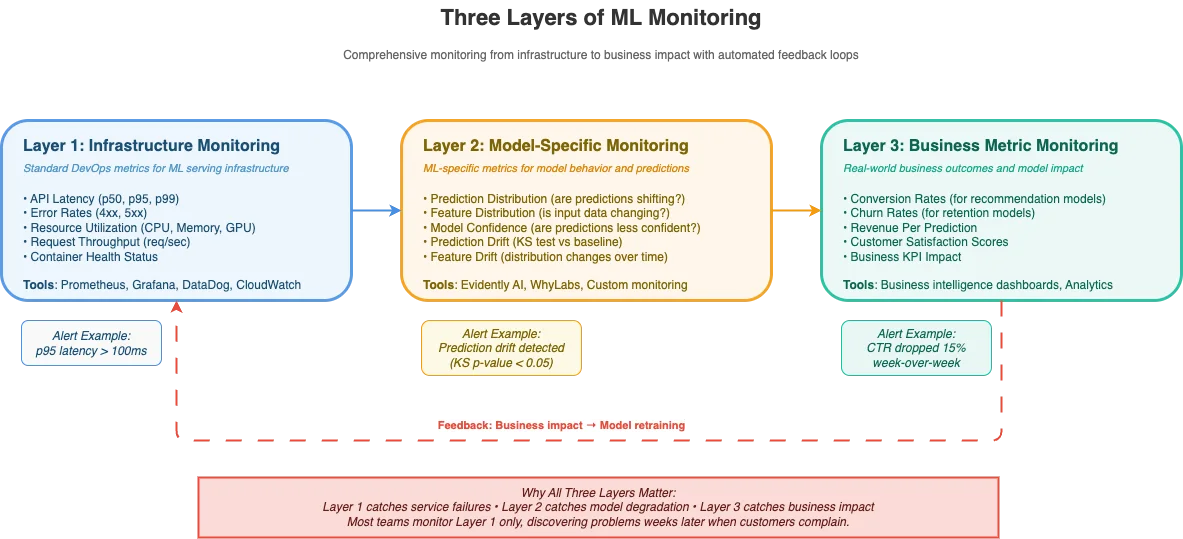
Layer 1: Infrastructure Monitoring (Standard DevOps)
Monitor the serving infrastructure like any other service:
API latency (p50, p95, p99)
Error rates (4xx, 5xx responses)
Resource utilization (CPU, memory, GPU)
Request throughput (requests/second)
Tools: Prometheus, Grafana, DataDog, CloudWatch
Layer 2: Model-Specific Monitoring
Monitor model behavior and predictions:
Prediction distribution: Are predictions shifting over time?
Feature distribution: Is input data changing?
Model confidence: Are predictions becoming less confident?
Prediction drift: KS test comparing current vs baseline predictions
Feature drift: Statistical tests for distribution changes
Layer 3: Business Metric Monitoring
Monitor actual business outcomes:
Conversion rates (for recommendation models)
Churn rates (for retention models)
Revenue per prediction
Customer satisfaction scores
How It Works
The implementation creates a comprehensive monitoring system:
1. Automated Metrics Collection
Every prediction logged with timestamp
Feature values recorded
Prediction confidence tracked
Latency measured
2. Drift Detection
Compare recent predictions to baseline distribution
Use Kolmogorov-Smirnov test (statistical test for distribution changes)
Alert if drift detected (p-value < 0.05)
Trigger retraining pipeline automatically
3. Alerting Rules
Alert 1: High prediction latency (p95 > 100ms for 5 minutes)Alert 2: High error rate (>1% for 5 minutes)Alert 3: Prediction distribution shift (average prediction shifted >15% for 30 minutes)Alert 4: Low prediction volume (< 10 predictions/sec for 10 minutes - potential service issue)
4. Automated Retraining
When drift detected, trigger pipeline automatically
Fetch latest data
Retrain model
Evaluate against current production model
Deploy only if better
Tools: Prometheus (metrics), Grafana (dashboards), Evidently AI (drift detection), custom monitoring
Business Impact
A financial services company implemented three-layer monitoring:
Layer 1 alone: Caught service outages, but missed model degradation
Adding Layer 2: Caught data drift 2 weeks before business metrics declined
Adding Layer 3: Quantified business impact ($2.3M revenue at risk)
The early warning from Layer 2 gave them time to investigate and retrain before customers were impacted.
The Cloud-Agnostic Alternative: Kubernetes + Argo
So far, we've built our pipeline using generic tools (MLflow, Feast, FastAPI). But how do we orchestrate the entire pipeline end-to-end?
Two main approaches:
Cloud-Specific: AWS SageMaker Pipelines, Azure ML Pipelines, Google Vertex AI Pipelines
Cloud-Agnostic: Kubernetes + Argo Workflows
The cloud-specific solutions are easier to set up but lock you into one provider. The cloud-agnostic approach requires more initial setup but gives you portability and avoids vendor lock-in.
Argo Workflows: Kubernetes-Native Orchestration
Argo Workflows is to Kubernetes what Airflow is to traditional data pipelines—a workflow orchestrator. But Argo runs entirely on Kubernetes, treating each pipeline step as a container.
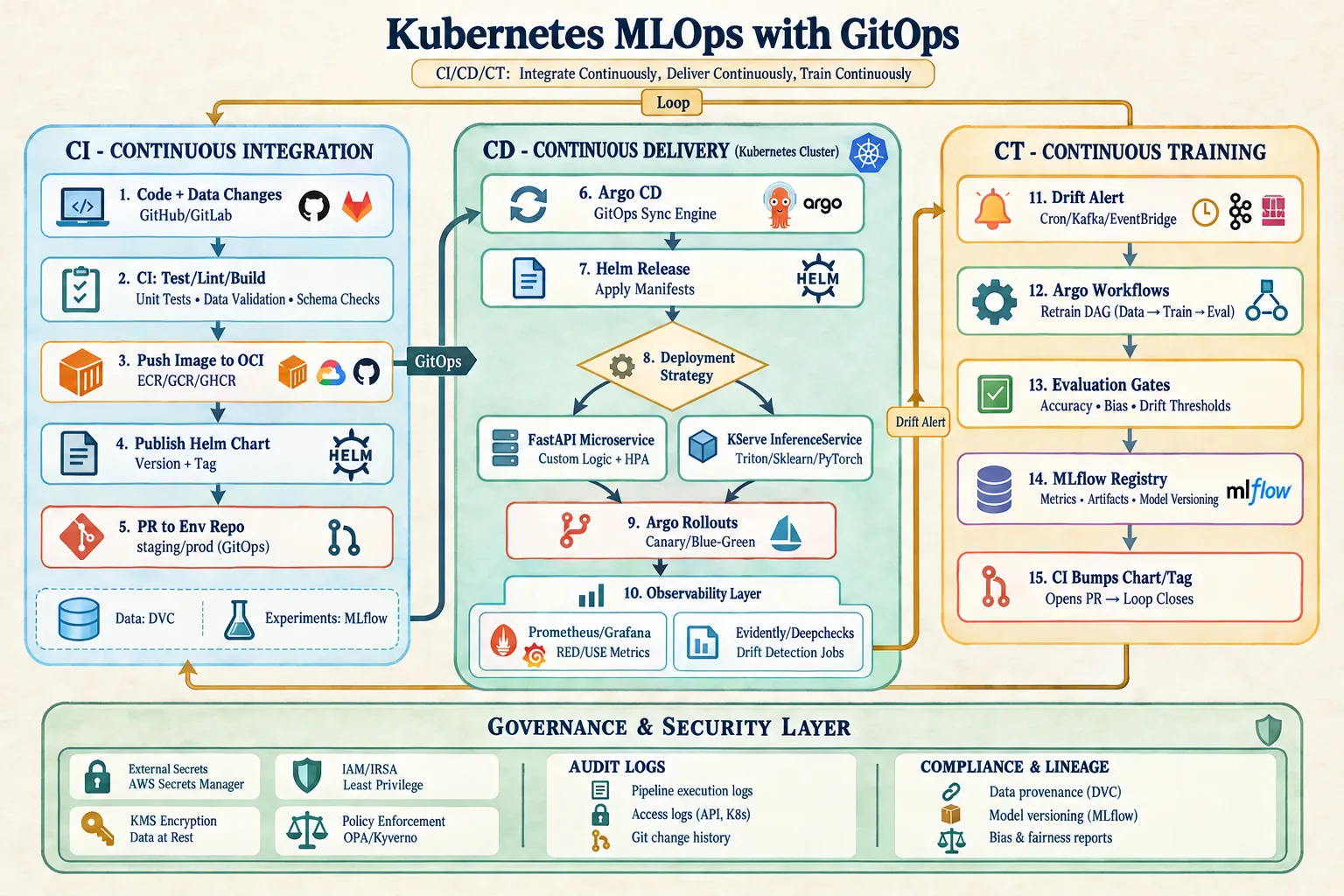
Benefits:
✅ Cloud-agnostic: Runs on AWS EKS, GCP GKE, Azure AKS, on-prem Kubernetes
✅ Native container support: Each step is a Docker container
✅ Parallelism: Run independent steps concurrently
✅ Resource management: Kubernetes handles scheduling, scaling, restarts
How It Works
1. Define Pipeline as Code
Write YAML specification defining all 6 steps
Specify dependencies (Step 2 depends on Step 1, etc.)
Configure resources for each step (CPU, memory, GPU)
Set environment variables and secrets
2. Trigger Pipeline
Manual trigger (on-demand)
Scheduled trigger (daily at 2am)
Event-driven trigger (new data arrives)
Git commit trigger (code changes)
3. Monitor Execution
Real-time progress tracking
View logs for each step
Debug failures
Track duration and resource usage
4. Handle Failures
Automatic retries with backoff
Notify team via Slack/email
Save state for debugging
Resume from failed step
Tools: Argo Workflows (orchestration), Kubernetes (infrastructure)
Business Impact
A healthcare company migrated from manual deployment to Argo-orchestrated pipelines:
Before: 1 model deployed per month (manual, error-prone)
After: 12 models deployed per month (automated, reliable)
Result: 12x increase in deployment velocity, zero manual errors
Your First Pipeline: The 30-Day Build Plan
You now have all the pieces. Here's a realistic 30-day plan to build your first production MLOps pipeline.
Week 1: Foundation (Days 1-7)
Days 1-2: Environment Setup
Set up Git repository for ML project
Initialize DVC for data versioning
Deploy MLflow tracking server
Create documentation structure
Days 3-4: Data Layer
Implement data ingestion
Add Great Expectations validation
Set up DVC tracking for datasets
Test end-to-end data flow
Days 5-7: Feature Engineering
Define initial features (start simple)
Implement feature engineering pipeline
Set up Feast feature store (optional for MVP)
Test feature generation
Milestone: You can ingest, validate, version, and transform data programmatically
Week 2: Training & Evaluation (Days 8-14)
Days 8-10: Model Training
Implement training script with MLflow tracking
Add hyperparameter search
Log model artifacts to MLflow
Test training flow
Days 11-14: Model Evaluation
Implement comprehensive evaluation
Define promotion gates (thresholds for deployment)
Create evaluation report generator
Test evaluation against multiple models
Milestone: You can train, evaluate, and approve/reject models automatically
Week 3: Deployment (Days 15-21)
Days 15-17: Containerization
Write Dockerfile for model serving
Implement FastAPI serving endpoint
Add health check and metrics endpoints
Test container locally
Days 18-21: Kubernetes Deployment
Set up local Kubernetes (minikube or Docker Desktop)
Deploy model to Kubernetes
Test API from outside cluster
Milestone: Model is deployed and serving predictions in Kubernetes
Week 4: Orchestration & Monitoring (Days 22-30)
Days 22-25: Pipeline Orchestration
Install Argo Workflows on Kubernetes
Write Argo workflow connecting all steps
Test full pipeline end-to-end
Add error handling and retry logic
Days 26-28: Monitoring
Deploy Prometheus + Grafana
Add prediction logging and metrics
Create dashboards for latency, throughput, drift
Set up basic alerts
Days 29-30: Polish & Documentation
Write README with setup instructions
Document how to trigger pipeline
Create runbook for common issues
Celebrate: You have a working MLOps pipeline! 🎉
Final Milestone: Complete automated pipeline from data → deployed model with monitoring
How mCloud Technology Can Help
Building your first MLOps pipeline is a significant undertaking. mCloud Technology specializes in accelerating ML teams through the "first pipeline challenge" with hands-on implementation support.
We help organizations build production-ready MLOps pipelines from scratch, modernize existing manual deployments, and design the right tooling architecture for their specific needs. Our battle-tested approach delivers working pipelines in 2-4 weeks, with full knowledge transfer to your team.
Conclusion
Building your first MLOps pipeline feels overwhelming—and it is. Six interconnected steps, dozens of tools, hundreds of configuration decisions.
But here's the truth: you don't need perfection. You need a working system you can iterate on.
Start simple:
Week 1: Automate data ingestion and validation
Week 2: Add experiment tracking and evaluation
Week 3: Containerize and deploy
Week 4: Add monitoring and orchestration
By day 30, you'll have a pipeline that:
✅ Ingests and validates data automatically
✅ Tracks experiments and lineage in MLflow
✅ Evaluates models across multiple dimensions
✅ Deploys only models that pass promotion gates
✅ Monitors for drift and performance degradation
✅ Runs end-to-end with a single command
It won't be perfect. Your second pipeline will be better. Your tenth pipeline will be elegant.
But your first pipeline? It just needs to work.
Sarah's weekend project wasn't perfect either. It lacked fairness checks, didn't monitor for drift, had no A/B testing. But it automated the deployment process, saving her team 20 hours per week.
Over the next year, they improved it iteratively: added evaluation gates, implemented monitoring, built canary deployments. By the time Sarah left, that weekend project had grown into a platform serving 30 data scientists deploying 50+ models.
Every production ML platform started as someone's "good enough" first pipeline.
Your turn to build yours.
References & Further Reading
[^1]: Great Expectations Documentation: https://docs.greatexpectations.io/ The standard tool for data validation in ML pipelines. Comprehensive docs on expectation suites and validation workflows.
[^2]: DVC (Data Version Control): https://dvc.org/doc Git for data. Essential for reproducible ML pipelines.
[^3]: Feast Feature Store: https://docs.feast.dev/ Open-source feature store for training-serving consistency.
[^4]: MLflow Documentation: https://mlflow.org/docs/latest/index.html The de facto standard for ML experiment tracking and model registry.
Books:
Building Machine Learning Pipelines by Hannes Hapke and Catherine Nelson (O'Reilly, 2020)
Designing Data-Intensive Applications by Martin Kleppmann (O'Reilly, 2017) – Essential background on data systems
Papers:
"Hidden Technical Debt in Machine Learning Systems" (Sculley et al., NeurIPS 2015)
"Challenges in Deploying Machine Learning: A Survey of Case Studies" (Paleyes et al., 2020)